Sunday, September 27, 2009

Computer change the world


Objective:

when i could see the video, i have some learned about this. To how computer works, and how computer systematically operate.


Summary:

The video of computer change the world is to define how computer starts and how computer very important in our lives. Because when you see the past several years there was many things are slow and delayed processing. Because of manual use and lack of technology. After several years the computer is invented,because of high ability to fast access, fast moving works, and easy to handle of heavy things. Etc., and the micro chip. micro chip is very important thing not only computer but use this any other devices. Micro chip is too little but can function all devices.


Conclusion:
The computer is the system can access all you needs. Like program. make a website. research and more.


Sunday, September 13, 2009

Hexadecimal numbers

A Brief Explanation
of Hexadecimal Numbers-


SAY WHAT?

When you are working with computers, and especially the Internet and the Web, you will eventually run into things like the above - - - Hexadecimal (HEX) Numbers.

The following will not pretend to make you a Hex math genius, but we will explain just what those funny letters mean.

When people evolved, they did so with ten fingers. (Yes we do have a few folks down in Horsepasture with 11 fingers and 12 toes, but that's social commentary, not math.)

Since we have ten fingers, and since early man probably used them as the first counting device, we learned to count in TENs. DECI, Latin for Ten, gave birth to the term DECImal.

Decimal numbers are based on POWERS of Ten.

1 x 10 = 10 10 x 10 = 100, 10 x 10 x 10 = 1,000 etc.

Since everything is based on Tens, we only need Ten Digits to represent every possible number.

1, 2, 3, 4, 5, 6, 7, 8, 9, 0
Note: The Romans had no number for, or possibly even the concept of Zero

So, let's start counting up from Zero in Decimal . . .

0 - 1 - 2 - 3 - 4 - 5 - 6 - 7 - 8 - 9 - OOPS - We're Out of Digits!

Since we ran out of digits, we need to do a bit of trickery to represent numbers higher than 9. What we do is start over with Zero as the rightmost digit, and put a One (1) to it's left. ---- 10 - 11 - 12 ... 18 - 19 - 20 - etc.

The "Decimal Place Holders" are all Powers of Ten

The rightmost digit tells us how many ONES are in the number.

The next digit to the left tells us how many TENS, the next, how many HUNDREDS, etc. Take the number 14, 728

How the Brain Decodes a Decimal Number

Powers of Ten 10,000s 1,000s 100's 10's Ones

1 4 7 2 8

To "Decode" this number, the brain subconsiously goes . . .

There is one Ten Thousand, Four One Thousands,
Seven One Hundreds, Two Tens and Eight Ones
Add them all together and you get 14,728

10,000 x 1 = 10,000
1,000 x 4 = 4,000
100 x 7 = 700
10 x 2 = 20
8 x 1 = 8

+
14, 728

That's how modern number systems work!


Now a fact, a question and a conclusion.

Fact: For reasons best left to people with Pocket Protectors and no personal skills, computers like to "Think" in 'groups' of EIGHT digits instead of Ten.

Question: What if people had evolved with Eight fingers per hand instead of Five?

Conclusion: We'd have developed a number system based on powers of Sixteen rather than powers of Ten

THAT is exactly what the HEXadecimal number system is, a number system based on 16's, not tens.

Let's start counting upwards from Zero in Hex . . .

1 - 2 - 3 - 4 - 5 - 6 - 7 - 8 - 9 - OOPS - Out of Digits again, but we don't do the add a Zero and scoot stuff over until we get to 16.

Where do you get the additional digits?
You Dont -- You Use Letters!

Dec 0 1 2 3 4 5 6 7 8 9 10 11 12 13 14 15 16 17 18 19 20 ... 24 25 26 27
Hex 0 1 2 3 4 5 6 7 8 9 A B C D E F 10 11 12 13 14 ... 18 19 1A 1B

Let's Decode the Hex Number F2A4C= 993,868

Powers of 16 65,536's 4096's 256's 16's Ones

F 2 A 4 C

To "Decode" this number, the NERD BRAIN
(Or Calculator More Likely) consciously thinks . . .

65,536 x F = 983,040
4,096 x 2 = 8,192
256 x A = 2,560
16 x 4 = 64
1 x C = 12

+
993,868


IF YOU'RE LOST,
DON'T FRET OVER IT!

There's no real need for you to take pencil in hand to figure this stuff out.
IF
you ever need to, you'll find handy Hex/Decimal calculators are supplied with both Windows and the Mac OS.

Also, at the moment, it's only important that you have a passing familiarity with this (and the Binary - Powers of Two) number system.

Let's Examine a Typical Browser Color Code.

FF33CC">

In our discussion of Hexadecimal Color Codes we explained that the above is called a TRIPLET, or group of THREE Numbers. (FF, 33 and cc)

Colors are specified by how much RED (from Zero to 255), Green (from Zero to 255) and Blue (from Zero to 255) are in the final color.

We must, however, specify these color values in Hex.

FF 33 CC Is Therefore . . .

FF (Hex) = 255 (Decimal) Points of Red
33 (Hex) = 51 (Decimal) Poinrs of Green
CC (Hex) = 204 (Decimal) Points of Blue

The Result Is This Color

Again please let me state that in the beginning, a passing familiarity with these number systems is all you need. At least you should no longer be intimidated when some piece of software asks you to enter something in Hex.

Interesting Fact: The fact that computers use alternate number systems explains why 1K (1000) in Computerese is REALLY 1,024 and 4K (4000) is Really 4,096. We're NOT working with even powers of Ten, but powers of Two.

Here Is A Handy Hex to Decimal and Binary Conversion Chart

The octal number system

banner_OctalNumSys.gif (10448 bytes)

Just as the decimal system with its ten digits is a base-ten system, the octal number system with its 8 digits, ‘0’, ‘1’, ‘2’, ‘3’, ‘4’, ‘5’, ‘6’ and ‘7’, is a base-eight system. Table 2-4 shows the weighting for the octal number system up to 3 decimal places before and 2 decimal places after the octal point (.).

Weights

82

81

80

.

8-1

8-2

Table 2-4 Octal Weights

Just like the other counting conventions discussed previously, the LSB is begins with zero (0) and is incremented until the maximum digit value is reached. The adjacent bit positions are then filled appropriately as the iterative counting process continues. Thus the counting convention for octal is 0,1,2,3,4,5,7,10,11,12,13,14,15,16,17,20….

Conversion from Octal to Decimal

To express the value of a given octal number as its decimal equivalent we just need to sum the digits after each has been multiplied by its associated weight.

Example #1

Convert (237.04) 8 to decimal form.

Weights

82

81

80

8-1

8-2

Weight Value

64

8

1

0.125

0.015625

Octal Number

2

3

7

0

4

Decimal Value

128

24

7

0

0.0625

Total (159.0625)10

Conversion from Decimal Whole Numbers to Octal

To convert from Decimal whole numbers to Octal we may use the systematic approach called the Repeated-Division-by-8 method shown in the example below.

Converting (359) 10 to Octal

  1. Divide the quotient by eight and record the remainder.

  2. Repeat step (a) until the quotient is equal to zero (0).

  3. The first remainder produced is the LSB in the octal number and the last remainder (R) the MSB. Accordingly, the octal number is then written (from left to right) with the MSB occurring first


8

359

8

44

R 7 (LSB)

8

5

R 4

8

0

R 5 (MSB)

Therefore, (359) 10 = (547) 8

Converting Decimal Fractions to Octal

The techniques used to convert decimal fractions to octal are similar to the methods demonstrated previously to convert decimal fractions to binary numbers. We may either use the sum-of–weights method or the repeated multiplication–by-8 method. In the multiplication–by-8 method we repeatedly multiply the fraction by eight, and record the carry, until the fraction product is zero. The first carry produced is the MSB, while the last carry is the LSM. Remember that the octal point precedes the MSB. To illustrate lets consider the conversion of (0.3125) 10 to octal.

0.3125 * 8

Carry

0.5 * 8

2 (MSB)

0.0

4 (LSB)

thus, (0.3125) 10 = (0.24) 8

Converting Octal to Binary

The primary application of octal numbers is representing binary numbers, as it is easier to read large numbers in octal form that in binary form. Because each octal digit can be represented by a three-bit binary number (see Table 2-5), it is very easy to convert from octal to binary. Simply replace each octal digit with the appropriate three-bit binary number as indicated in the examples below.

Octal Digit

Binary Digit

0

000

1

001

2

010

3

011

4

100

5

101

6

110

7

111

Example #1 Table 2-5 Octal and Binary Numbers


Converting Binary to Octal

Converting binary to octal is also a simple process. Break the binary digits into groups of three starting from the binary point and convert each group into its appropriate octal digit. For whole numbers, it may be necessary to add a zero as the MSB in order to complete a grouping of three bits. Note that this does not change the value of the binary number. Similarly, when representing fractions, it may be necessary to add a trailing zero in the LSB in order to form a complete grouping of three.

Examples:

  1. Converting (010111) 2 to Octal

111 = 7 (LSB)

010 = 2 (MSB)

thus, (010111) 2 = (27) 8

  1. Converting (0.110101) 2 to Octal

110 = 6 (MSB)

111 = 5 (LSB)

thus, (0.110101) 2 = (0.65) 8


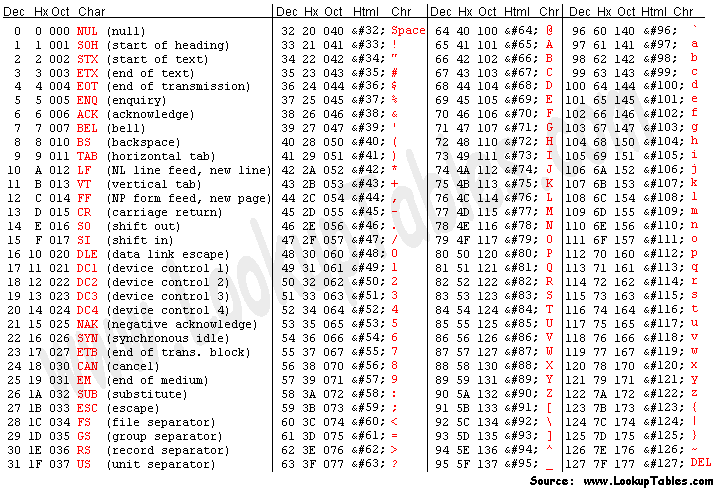
ASCII Code


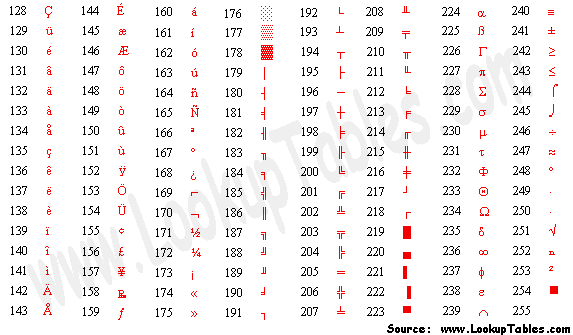
Extended ASCII Codes
As people gradually required computers to understand additional characters and non-printing characters the ASCII set became restrictive. As with most technology, it took a while to get a single standard for these extra characters and hence there are few varying 'extended' sets. The most popular is presented below.

EBCDIC Code

Extended Binary Coded Decimal Interchange Code (EBCDIC)

is an 8-bit character encoding (code page) used on IBM mainframe operating systems such as z/OS, OS/390, VM and VSE, as well as IBM midrange computer operating systems such as OS/400 and i5/OS (see also Binary Coded Decimal). It is also employed on various non-IBM platforms such as Fujitsu-Siemens' BS2000/OSD, HP MPE/iX, and Unisys MCP. EBCDIC descended from the code used with punched cards and the corresponding six bit binary-coded decimal code used with most of IBM's computer peripherals of the late 1950s and early 1960s.

History

EBCDIC was devised in 1963 and 1964 by IBM and was announced with the release of the IBM System/360 line of mainframe computers. It was created to extend the Binary-Coded Decimal encoding that existed at the time. It is an 8-bit character encoding, in contrast to, and developed separately from, the 7-bit ASCII encoding scheme.

While IBM was a chief proponent of the ASCII standardization committee, they did not have time to prepare ASCII peripherals (such as card punch machines) to ship with its System/360 computers, so the company settled on EBCDIC at the time. The System/360 became wildly successful, and thus so did EBCDIC.

All IBM mainframe peripherals and operating systems (except Linux on zSeries or iSeries) use EBCDIC as their inherent encoding,[1] but software can translate to and from other encodings. Many hardware peripherals provide translation as well and modern mainframes (such as IBM zSeries) include processor instructions, at the hardware level, to accelerate translation between character sets.

At the time it was devised, EBCDIC made it relatively easy to enter data into a computer with punch cards. Since punch cards are no longer used on mainframes, EBCDIC is used in modern mainframes primarily for backwards compatibility. It does have an advantage of limiting the number of hole punches per column to 2 holes for uppercase and numbers, which increases the durability of these punch cards as they are handled by a card reader. This encoding is also known as Hollerith code. [2]

EBCDIC has no modern technical advantage over ASCII-based code pages such as the ISO-8859 series or Unicode. There are some technical niceties in each, e.g., ASCII and EBCDIC both have one bit which indicates upper or lower case. But there are some aspects of EBCDIC which make it much less pleasant to work with than ASCII (such as a non-contiguous alphabet). As with single-byte extended ASCII codepages, most EBCDIC codepages only allow up to 2 languages (English and one other language) to be used in a database or text file.

Where true support for multilingual text is desired, a system supporting far more characters is needed. Generally this is done with some form of Unicode support. There is an EBCDIC Unicode Transformation Format called UTF-EBCDIC proposed by the Unicode consortium, but it is not intended to be used in open interchange environments and, even on EBCDIC-based systems, it is almost never used. IBM mainframes support UTF-16, but they do not support UTF-EBCDIC natively.

Arabic EBCDIC versions are typically in presentation order, in left to right order as displayed by an older mainframe or line printer, rather than in the right to left logical order used by modern encodings such as Unicode.


Code page layout

The table below is derived from CCSID 500, one of the code page variants of EBCDIC, showing only the basic (English) EBCDIC characters. Characters 00–3F and FF are controls, 40 is space, 41 is no-break space (RSP: "Required Space"), E1 is numeric space (NSP: "Numeric Space"), and CA is soft hyphen. Characters are shown with their equivalent Unicode codes. Invariant alphanumeric, punctuation, and control characters common to all EBCDIC code pages are shown in color. Unassigned codes are typically filled with international or region-specific characters in the various EBCDIC code page variants.

EBCDIC

—0 —1 —2 —3 —4 —5 —6 —7 —8 —9 —A —B —C —D —E —F

0−
NUL
0000
0
SOH
0001
1
STX
0002
2
ETX
0003
3
SEL

4
HT
0009
5
RNL

6
DEL
007F
7
GE

8
SPS

9
RPT

10
VT
000B
11
FF
000C
12
CR
000D
13
SO
000E
14
SI
000F
15

1−
DLE
0010
16
DC1
0011
17
DC2
0012
18
DC3
0013
19
RES ENP

20
NL
0085
21
BS
0008
22
POC

23
CAN
0018
24
EM
0019
25
UBS

26
CU1

27
IFS
001C
28
IGS
001D
29
IRS
001E
30
IUS ITB
001F
31

2−
DS

32
SOS

33
FS

34
WUS

35
BYP INP

36
LF
000A
37
ETB
0017
38
ESC
001B
39
SA

40
SFE

41
SM SW

42
CSP

43
MFA

44
ENQ
0005
45
ACK
0006
46
BEL
0007
47

3−


48


49
SYN
0016
50
IR

51
PP

52
TRN

53
NBS

54
EOT
0004
55
SBS

56
IT

57
RFF

58
CU3

59
DC4
0014
60
NAK
0015
61


62
SUB
001A
63

4−
SP
0020
64
RSP
00A0
65


66


67


68


69


70


71


72


73


74
.
002E
75
<
003C
76
(
0028
77
+
002B
78
|
007C
79

5−
&
0026
80


81


82


83


84


85


86


87


88


89
!
0021
90
$
0024
91
*
002A
92
)
0029
93
;
003B
94
¬
00AC
95

6−
-
002D
96
/
002F
97


98


99


100


101


102


103


104


105
¦
00A6
106
,
002C
107
%
0025
108
_
005F
109
>
003E
110
?
003F
111

7−


112


113


114


115


116


117


118


119


120
`
0060
121
:
003A
122
#
0023
123
@
0040
124
'
0027
125
=
003D
126
"
0022
127

8−


128
a
0061
129
b
0062
130
c
0063
131
d
0064
132
e
0065
133
f
0066
134
g
0067
135
h
0068
136
i
0069
137


138


139


140


141


142
±
00B1
143

9−


144
j
006A
145
k
006B
146
l
006C
147
m
006D
148
n
006E
149
o
006F
150
p
0070
151
q
0071
152
r
0072
153


154


155


156


157


158


159

A−


160
~
007E
161
s
0073
162
t
0074
163
u
0075
164
v
0076
165
w
0077
166
x
0078
167
y
0079
168
z
007A
169


170


171


172


173


174


175

B−
^
005E
176


177


178


179


180


181


182


183


184


185
[
005B
186
]
005D
187


188


189


190


191

C−
{
007B
192
A
0041
193
B
0042
194
C
0043
195
D
0044
196
E
0045
197
F
0046
198
G
0047
199
H
0048
200
I
0049
201
SHY
00AD
202


203


204


205


206


207

D−
}
007D
208
J
004A
209
K
004B
210
L
004C
211
M
004D
212
N
004E
213
O
004F
214
P
0050
215
Q
0051
216
R
0052
217


218


219


220


221


222


223

E−
\
005C
224


225
S
0053
226
T
0054
227
U
0055
228
V
0056
229
W
0057
230
X
0058
231
Y
0059
232
Z
005A
233


234


235


236


237


238


239

F−
0
0030
240
1
0031
241
2
0032
242
3
0033
243
4
0034
244
5
0035
245
6
0036
246
7
0037
247
8
0038
248
9
0039
249


250


251


252


253


254
EO

255

—0 —1 —2 —3 —4 —5 —6 —7 —8 —9 —A —B —C —D —E —F

Criticism and humor

Open-source-software advocate and hacker Eric S. Raymond writes in his Jargon File that EBCDIC was almost universally loathed by early hackers and programmers because of its multitude of different versions, none of which resembled the other versions, and that IBM produced it in direct competition with the already-established ASCII.

Another popular complaint is that the EBCDIC alphabetic characters follow an archaic punch card encoding rather than a linear ordering like ASCII. One consequence of this is that incrementing the character code for "I" does not produce the code for "J", and likewise there is a gap between the codes for "R" and "S". Thus programming a simple control loop to cycle through only the alphabetic characters is problematic.